Getting Started & Survival
Pet Menu & Commands
Use the pet menu to keep track of your selected pet and give it commands. Learn the controls somewhere safe before relying on them during a fight.
Read your pet’s menu
The name identifies your selected pet. The coloured bar behind it shows that pet’s remaining health, and Level shows its current level. Keep an eye on the health bar during combat.
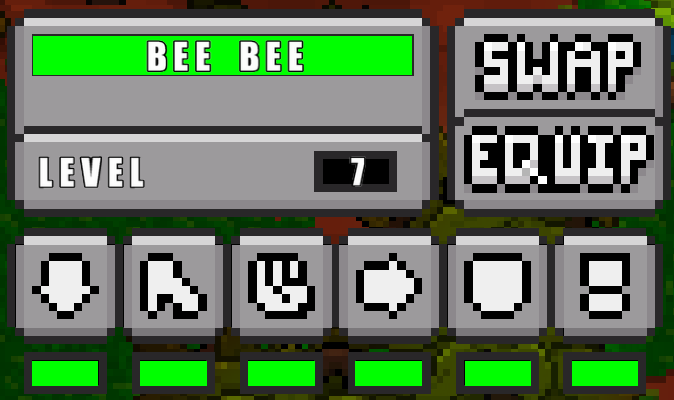 Pet menu and command buttonsView full size
 Swap changes which pet is selected when you have more than one. Equip opens the pet selection and equipment menu.
The small strips below the command buttons show progress towards unlocking commands as your pet levels up. An unavailable command is greyed out. Power can also be unavailable while its cooldown is running.
Give your pet a command
Hover over a command button to see its name. You can click the button or use its keyboard shortcut once the command is unlocked.
Come (Z): call your pet back towards you.
Heel (X): ask your pet to stay close as you move.
Stay (C): ask your pet to hold its current position.
Attack (V): prepare an attack command, then click a target in the world to direct your pet towards it.
Flee (B): tell your pet to retreat from danger.
Power (N): activate your pet’s special power when it is unlocked and ready. Wait for its cooldown before using it again.
Practise before a fight
Check which pet is selected and which commands are available. Practise Come, Heel and Stay in a safe place so you can find the right control quickly.
Watch your pet’s health during a fight and use Flee when you want it to retreat. Commands are requests to the pet; keep watching what it actually does rather than assuming it is safe.
Try this
In a safe area, use Stay and move a short distance away. Use Come to call your pet back, then Heel before setting off together. Check its health and available commands before your next encounter.